SCHOOL ERP SOFTWARE IN HYDERABAD

School ERP software built for Hyderabad's two-board, two-language reality

Running CBSE alongside the Telangana SSC stream means two grading patterns, and reaching every parent means Telugu as well as English. Most school software treats both as an afterthought. Campus 24x7 lets you configure each board's grading bands once and send parent alerts in the language each family actually reads — from your own WhatsApp number, on the day it matters.

Used by schools across IndiaCBSE, ICSE and Telangana SSCTelugu and English parent alerts
The daily picture

What actually slows a Hyderabad school down

These are not edge cases. They are the patterns that repeat every week across the city, and each one has the same root cause: the information exists, but not where the person who needs it is standing.

01

Two boards, two report card formats, one exam team

Many Hyderabad schools run CBSE alongside the Telangana SSC stream, and the two grade differently. The exam team ends up rebuilding mark sheets by hand each term because one spreadsheet cannot hold both grading rules at once.

02

Parent updates need Telugu as well as English

A circular that goes out in English only gets read by some of the class and missed by the rest. Schools then repeat the same message by phone, which is where the admin hours disappear.

03

ORR and corridor traffic breaks the first period

Routes feeding Gachibowli, Kondapur, Kukatpally and LB Nagar lose time to peak-hour congestion. Attendance gets marked late, and the front office spends the first hour answering calls about buses it cannot see.

04

Fee follow-up runs on a call list

Accounts prints a pending list, divides it between staff, and starts dialling. The list is stale by afternoon, two parents get called twice, and nobody can say what was actually collected until the day closes.

05

Admission season compresses into a few weeks

In competitive school zones, enquiries arrive faster than one desk can file them. Documents sit in a tray, follow-ups are remembered rather than recorded, and genuine applicants go quiet while waiting.

06

Branches drift apart on process

School groups with campuses in the western and eastern zones often run separate registers and separate fee books. Any question that spans branches turns into a week of reconciliation before anyone can answer it.

One connected day

How your school runs on Campus 24x7

Each step hands the next one its data. Your team updates once, and the system carries it forward instead of asking someone to re-enter it.

  1. Enquiry arrives and the office records it with documents attached verification starts the same day instead of waiting for a tray to be cleared
  2. Admission is approved the student profile, class and section are created without re-typing anything
  3. A teacher marks the register in class the office sees a live count and the principal sees the trend
  4. A child is marked absent the parent gets one WhatsApp alert that day, in your school's own template language
  5. The fee schedule is published reminders go out before the due date rather than after it
  6. A payment is recorded the ledger updates and the receipt reaches the parent on WhatsApp automatically
  7. Marks are entered once your configured grading bands run and the report card is ready to release
  8. A circular is sent it goes out on the app and WhatsApp, and you can see who has read it
  9. Management opens the dashboard attendance, fees and transport are on one screen, current to this morning
Built for Telangana

Two boards and two languages, handled properly

Hyderabad schools rarely run a single board or a single language. These are the two places generic ERP software breaks first, so they are worth being specific about.

CBSE and Telangana SSC grading, side by side

  • Grading scales are configured per school, so CBSE and Telangana SSC bands can run side by side
  • Each band sets its own label, percentage range and grade points, matching your board's rule exactly
  • Term and exam structures are defined per academic year rather than hardcoded
  • Report cards are generated from whichever scale the class is mapped to

Grading Scale Configuration

CBSE
Example CBSE grading scale configured in Campus 24x7, showing grade labels, percentage ranges and grade points
GradePercentage RangeGrade Point
A191 - 10010
A281 - 909
B171 - 808
B261 - 707
C151 - 606

One example configuration. Your school sets its own bands per scale, so an SSC stream runs on its own rows alongside this one.

Telugu and English parent messaging

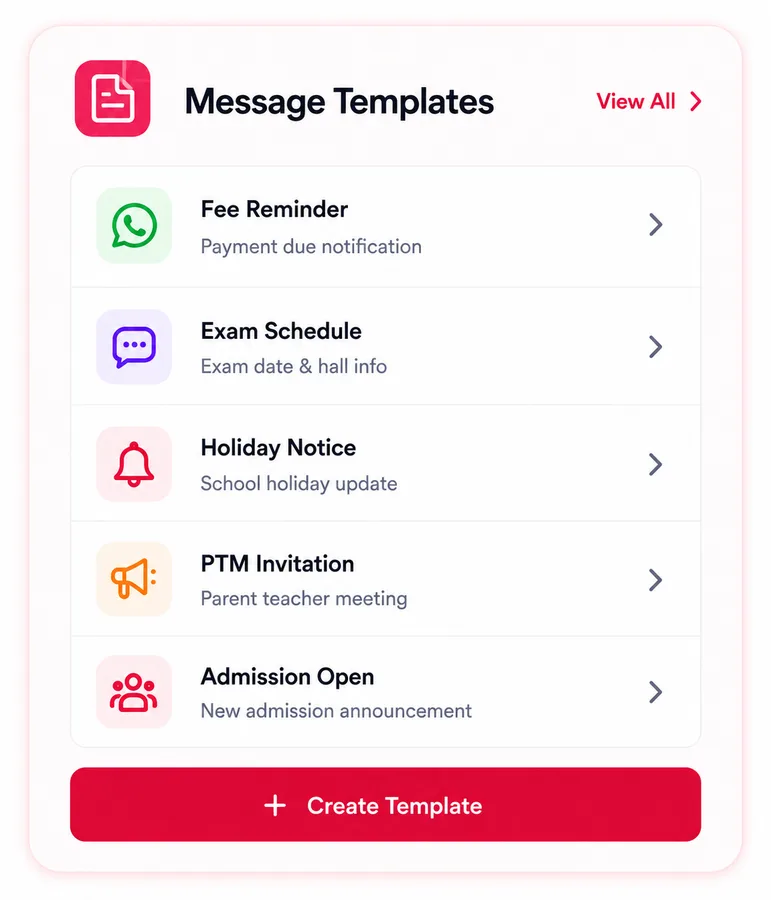
  • WhatsApp templates are stored per institution, each with its own language
  • Telugu and English versions of the same alert can run together
  • Absence alerts, fee receipts and exam results all use your approved templates
  • Messages go from your school's own WhatsApp number, not a shared gateway
Campus 24x7 message template library listing reusable fee reminder, exam schedule, holiday notice and PTM invitation templates
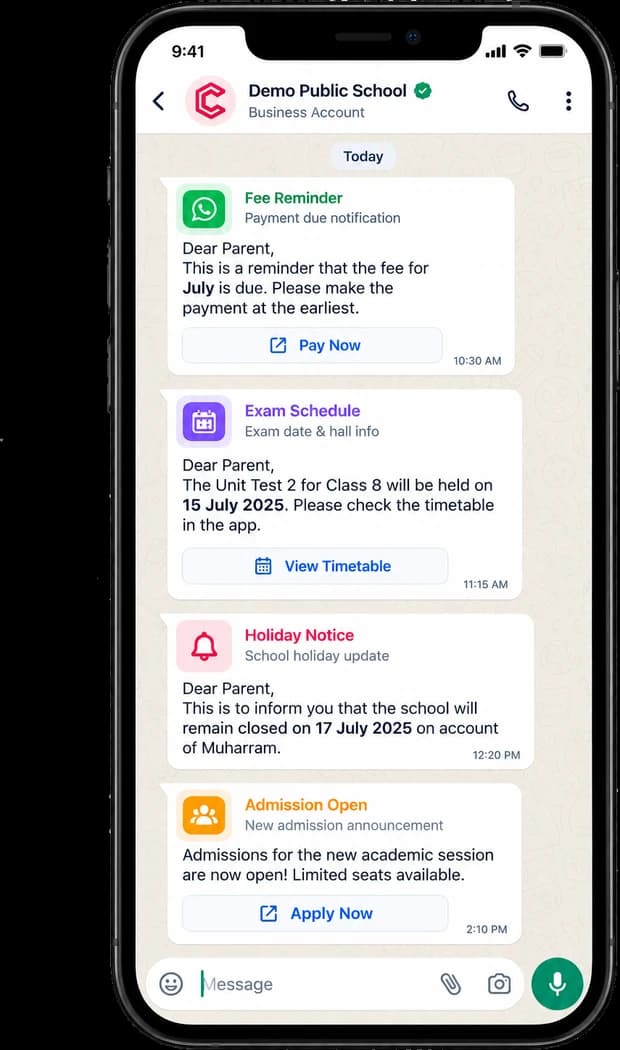
A parent's WhatsApp thread with a school on Campus 24x7, showing a fee reminder, an exam schedule, a holiday notice and an admission announcement, each sent from the school's verified business account

The Board of Secondary Education, Telangana — headquartered at Nampally, here in Hyderabad — sets the SSC pattern that a large share of the city's schools follow, while CBSE sets a different one.

A school running both does not need two systems. It needs one that treats a grading scale as something you configure rather than something the vendor decided for you — and the same goes for the language a circular goes out in.

In the product

Marked in class, on the parent's phone the same day

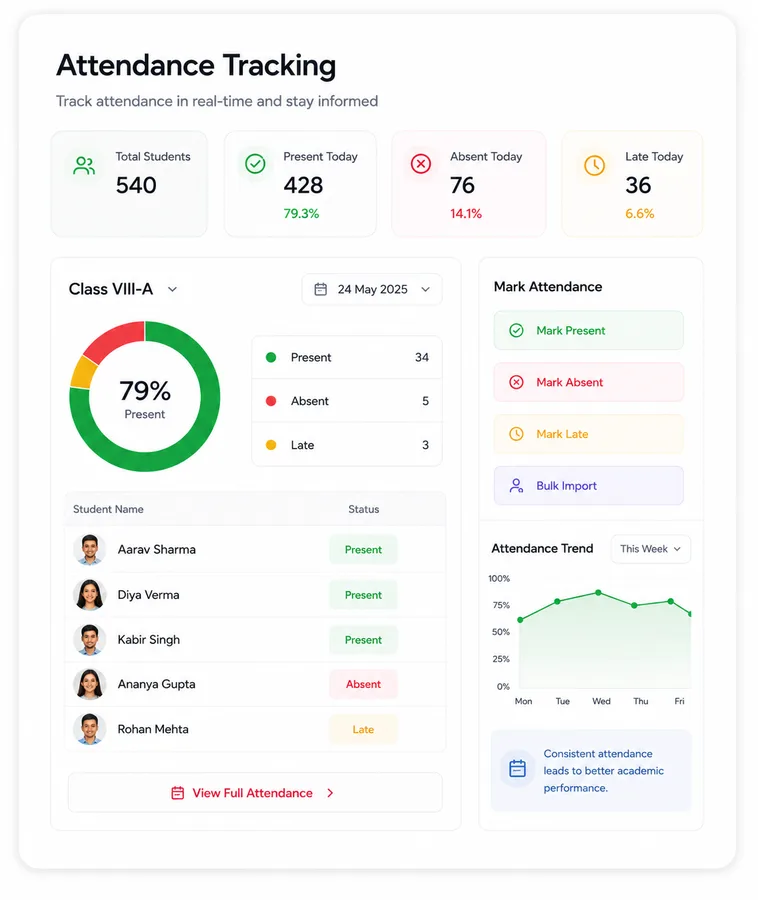
The two screens here are the ends of one workflow. Nobody exports a list, and nobody builds an evening call sheet.

Campus 24x7 attendance dashboard showing a live class register, present and absent counts, and a weekly attendance trend
A parent's WhatsApp thread with a school on Campus 24x7, showing a fee reminder, an exam schedule, a holiday notice and an admission announcement, each sent from the school's verified business account

The parent hears from your school's own WhatsApp number, using your approved template — in Telugu or English, whichever that family reads.

Core modules

What each module actually does

Described as workflows rather than feature lists, because the question that matters is what changes on a Tuesday morning.

Fee Management

  • Term plans, concessions and late-fee rules are set once and applied by rule, not by memory
  • Reminders go out before the due date, so collection stops depending on a call list
  • Receipts reach parents on WhatsApp the moment a payment is recorded
  • Pending dues are visible by class and section, current rather than printed this morning
Explore Fee Management

Attendance

  • Teachers mark the register in class, so the office sees a live count instead of chasing slips
  • Absence triggers one parent alert per child per day — re-saving the register will not send it twice
  • Running percentages are tracked against your threshold, so shortfalls surface early
  • Monthly reports are generated rather than counted by hand
Explore Attendance

Exams and Report Cards

  • Grading scales are configured per institution — set CBSE bands and SSC bands side by side
  • Each band carries its own label, percentage range and grade points, matching your board's rule
  • Marks are entered once and totals, grades and grade points calculate themselves
  • Report cards are published digitally, so the office is not printing for a week
See Exam Workflows

Parent Communication

  • WhatsApp templates are stored per institution with their own language setting
  • Run Telugu and English templates together and send each family the one it reads
  • Absence alerts, fee receipts, exam results and admission welcomes go out automatically
  • Delivery is recorded, so a missed message is something you can find rather than assume
See Communication Tools

Student Records

  • Profile, documents and category are mapped at admission and stay in one place
  • Medical notes are visible to both the teacher and the office, not just the file
  • Transfer and certificate requests follow an approval route instead of a verbal nod
  • Records stay searchable across years, including for students who have left
See Student Management

Staff, Transport and HR

  • Role-based access means a teacher sees their classes and an accountant sees the ledger
  • Leave requests are raised and approved in the app, which makes substitution planning possible
  • Buses are tracked live from the driver's app, so the office can answer before the parent calls
  • Payroll runs produce salary slips your staff can download themselves
See Transport and Staff
The difference

Manual work vs Campus 24x7

The left column is not a straw man. It is how most schools in the city run today, and it works — until the day something needs answering quickly.

Comparison of manual school processes against Campus 24x7 for Hyderabad schools
AreaManual todayWith Campus 24x7
AdmissionsEnquiries in a notebook, follow-ups from memoryEvery enquiry recorded with documents, and a status anyone can check
AttendanceRegisters collected at lunch, parents called in the eveningLive register, one same-day parent alert per absent child
FeesA printed pending list divided between staff to dialReminders before the due date, receipts on WhatsApp, dues current
Two boardsCBSE and SSC mark sheets rebuilt by hand each termBoth grading scales configured once and applied automatically
LanguageOne English circular, then phone calls to everyone who missed itTelugu and English templates, each family gets the one it reads
TransportThe office calls the driver to find out where the bus isLive tracking on the dashboard and in the parent app
ReviewEach team sends its numbers, management assembles them weeklyOne dashboard, current to this morning
By school type

Where schools usually start

Rollout order matters more than module count. These are the sequences that tend to work.

Single-campus schools

  • Start with attendance, fees and communication, then add exams and transport
  • Replace the front-office paper trail without retraining the whole staff at once
  • Give parents one app instead of four WhatsApp groups

Large K-12 campuses

  • Run admissions, academics, transport and exams at full scale
  • Track attendance and fee patterns down to section level
  • Keep principal, coordinators and admin reading the same dashboard

Multi-branch school groups

  • Standardise fee heads and grading across western and eastern zone campuses
  • Keep central oversight while each branch manages its own day
  • Compare branches on the same numbers instead of reconciling three formats
What changes

The shifts schools notice first

Less chasing, better fee timing, and communication you can verify rather than hope about.

Same dayAbsence reaches the parent

One WhatsApp alert per absent child, on the day it happens.

Before dueFee reminders go out

Scheduled ahead of the date rather than chased afterwards.

2 boardsGrading scales in parallel

CBSE and SSC bands configured once and applied automatically.

2-4 weeksTypical core go-live

Most schools start with core modules and expand by phase.

Cloud access for every team
Data backup and access controls
Transport tracking with alerts
Parent and teacher mobile access
Questions

School ERP software in Hyderabad: common questions

Does Campus 24x7 support Telangana SSC grading as well as CBSE?
Yes. Grading scales are configured per school, and each scale holds its own bands — label, percentage range and grade points. A school running both streams sets up one scale for CBSE and another for the Telangana SSC pattern, maps each class to the right one, and report cards generate accordingly. Nothing is hardcoded to a single board.
Can we send parent messages in Telugu?
Yes. WhatsApp templates are stored per school with their own language setting, so Telugu and English versions of the same alert can run together and each family receives the one it reads. This covers automated messages too — absence alerts, fee receipts, exam results and admission welcomes.
How long does setup take for a Hyderabad school?
Most schools go live on core modules in two to four weeks. We normally start with attendance, fees and communication, because those produce visible relief fastest, then add exams, transport and HR once the staff are comfortable.
Can you migrate our existing student and fee data?
Yes. We migrate from Excel, from exported files and from most existing software. Your team reviews a validated sample before the full migration runs, so nothing moves across unchecked.
Which payment methods are supported for parents?
Parents can pay via UPI, cards, and net banking. Each transaction is recorded instantly with automatic digital receipt generation.
Do parents and teachers get mobile apps?
Yes. Parents and staff get separate role-based apps covering attendance, fees, communication, exams and transport. Drivers use a separate app that powers live bus tracking.
Can Campus 24x7 handle a multi-branch school group?
Yes. Branches can share fee heads, grading scales and communication templates while keeping their own day-to-day operations, and management gets reporting across all of them without each branch exporting a different format.
What happens to our transport calls during peak traffic?
Buses are tracked live from the driver's app, so the front office can see where a vehicle is rather than phoning the driver. Parents see the same information in their app, which is what actually reduces the call volume on a bad traffic morning.
Ready to run your Hyderabad school on one connected system?

If your team is still rebuilding mark sheets each term and repeating circulars by phone, a short demo will show you what changes. We will set it up against your boards and your languages, not a generic template.